Designing the Scatter boss
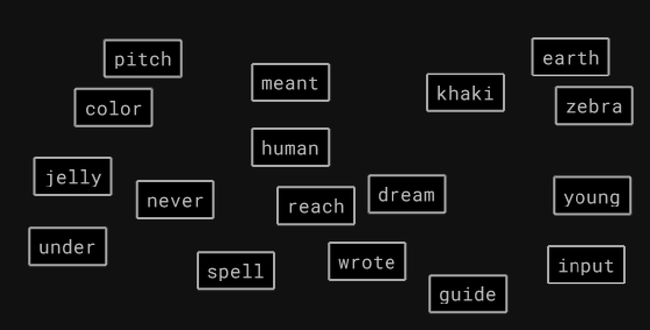
Scatter is the newest boss in Keeb Quest. It started as a challenge in Academy called Word Sweep, and I made the boss version the same day I finished the challenge.
#Word Sweep
Twenty-six words appear on the screen, one for each letter of the alphabet. You type all of them. Your score is how long it took.
Every word starts with a different letter, so the first key you press tells the game which word you’re typing. If you press z, you’re typing zebra. You never have to stop and pick a target.
The words start stacked in the middle of the screen and spread out to random spots when the challenge begins.
The skill it trains is scanning. You have to type every word anyway, so it comes down to how quickly you find the next word while you’re still finishing the current one.
#Turning it into a boss
Word Sweep only has a clock. Scatter uses the same screen and puts a boss in the middle with an ATB gauge, like every other enemy in the game. When the gauge fills, it hits you.
The words in Scatter aren’t all the same length. They get longer later in a run, the same as with the other bosses.
A fight can have more than twenty-six words, so I couldn’t keep one word per letter. The game tries not to put two words with the same first letter on screen at once.
The fight starts with a few words and adds more as you clear them. When you finish a word, the hero fires a bolt from the sword at it, and the word breaks apart when the bolt hits.
Apart from typos, the boss’s attacks are the only thing in Scatter that can hurt you. Words don’t fall and they don’t expire. Because of that, I made this boss attack more often than Line Rush’s boss, with each hit doing less damage.
#Where words appear
Placement took the most tries to get right. My first version put every new word in the biggest empty space on screen. That spread them out, but after a few words it looked like an evenly spaced grid, so I added some randomness.
It also pushed words into the corners when there weren’t many on screen, so you had to look all over the screen to find a handful of words. Now words stay closer to the boss while the screen is sparse and spread outward as it fills.
Words never overlap each other. They also stay off the hero and off the boss’s ATB gauge, so you can always see when the next attack is coming. Phones don’t have room for that, so there words can cover the gauge.
#How fast words come back
The first version tried to keep about twelve words on screen. That was too many for the first boss of a run. Now the first fight opens with fewer words, and each level adds one more, up to a limit.
New words arrive slowly while the screen is mostly full and speed up as you clear it. If you’re down to only a few words, a new one shows up right away, so you’re never left with nothing to type.
For a while, new words kept appearing at the exact moment you finished one. It felt like the game was reacting to your keystrokes instead of running on its own. I changed it so finishing a word makes the next one come sooner but never instantly, and added some randomness so new words don’t arrive on a steady beat.
#The bolt
Score and combo count the moment you finish typing a word, so a word on the far side of the screen counts as fast as one right next to you. The score number waits and pops up on the word when the bolt hits.
Once you type the last word, the boss stops attacking, so it can’t hit you while the last bolt is still flying.
I liked the bolt enough that I updated Falling Words’ bolts to use the same animation.
#Word Sweep and Scatter
The two modes look almost the same. In Word Sweep you’re only racing your own time, and you can slow down on a hard word as long as your total is fast. In Scatter you still pick your own order, but the boss’s gauge keeps filling while you look for the next word.
Every other boss came from somewhere outside the game. Scatter is the first one that came from another part of Keeb Quest.